

A home can contain twenty connected devices and still feel frustratingly unintelligent.
The lights may require one app, the thermostat another, the doorbell a third. A voice assistant sits awkwardly on a shelf. Charging cables collect around the sofa. An automated blind stops working when the internet drops. Guests cannot find the switch for the lamps.
That is the problem smart home DecoradTech should solve.
What Smart Home DecoradTech Really Means
“Smart home DecoradTech” is an emerging online term rather than a formally defined industry standard. Different websites use it to describe a brand, a platform or a combination of decoration and technology. A more useful definition is this:
Smart home DecoradTech is a design-first approach to integrating connected technology into a home so that it improves daily life without disrupting the appearance, comfort or usability of the space.
The order matters.
A conventional smart-home project often begins with a product: a camera, speaker, bulb or thermostat. A design-first project begins with a household problem. The technology is selected only after the desired experience, room layout and practical constraints are understood.
The aim is not to make every object connected. It is to make the home easier to live in.
Start With Friction, Not Gadgets
Before buying anything, spend several days noticing small moments of household friction.
Which lights are repeatedly left on? Where do cables accumulate? Does the bedroom become too warm before you wake up? Is the entrance dark when you return with shopping bags? Does someone regularly wonder whether the garage door was closed? Is a family member unable to reach a switch comfortably?
These observations are more valuable than a list of trending products.
Create three columns:
| Daily friction | Desired result | Possible solution |
|---|---|---|
| Dark hallway at night | Safe low-level lighting | Motion sensor and dimmable light |
| Bedroom overheats before morning | More consistent comfort | Programmable thermostat or room sensor |
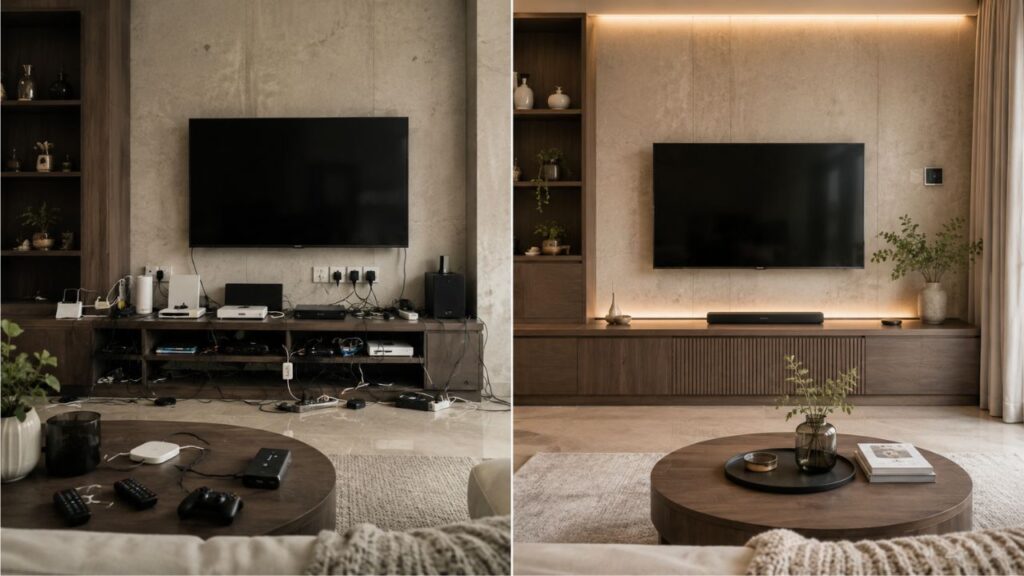
| TV area looks cluttered | Fewer visible wires | In-wall cable route or ventilated media cabinet |
| Lights remain on after everyone leaves | Reduce unnecessary use | Occupancy-based shutoff routine |
| Concern about a leak while travelling | Earlier warning | Water-leak sensors and automatic valve |
This process prevents one of the most common smart-home mistakes: buying a device because its demonstration looks impressive and then discovering that it solves no meaningful problem.
A useful system should remove decisions, reduce repetitive actions or provide information at the moment it matters. If it merely adds another notification, password and application, it may be creating work rather than removing it.
The Five-Layer DecoradTech Planning Framework
A well-integrated smart home can be planned in five layers.
Lifestyle
Begin with the people who use the home.
Consider working hours, sleep schedules, children, pets, guests, mobility needs and comfort preferences. A technically advanced routine is not successful when only one person understands it.
Essential functions should remain obvious. Visitors should be able to turn on a lamp without downloading an application. A cleaner should not need a voice command to operate the blinds. A child should not be able to disable a security routine accidentally.
Space
Study the physical room before selecting hardware.
Look at outlet positions, wall construction, furniture placement, natural light, cable paths and visible finishes. Decide which devices may become design features and which should disappear.
A sculptural smart lamp can be intentionally displayed. A router, hub and collection of power adapters usually belong in a ventilated but visually quiet location. Sensors should be positioned for performance without making the room feel monitored.
Infrastructure
Connected products depend on ordinary infrastructure: power, wiring and a reliable network.
Check wireless coverage in entrances, outdoor areas, upper floors and rooms with thick walls. Confirm whether existing wall switches have the wiring required by a proposed smart switch. Plan access to power before mounting cameras, displays or motorized shades.
Do not conceal networking equipment inside a sealed cabinet simply to improve appearance. Heat, blocked signals and difficult access can create larger problems later.
Ecosystem
Choose a primary control environment before buying across multiple brands.
The goal is not necessarily to purchase every device from one company. It is to ensure that the products can be controlled through a manageable number of interfaces and can participate in the routines you intend to build.
Matter has improved cross-platform interoperability by giving compatible products a shared smart-home standard. Matter 1.5 expanded support into areas including cameras, closures, soil sensors and more advanced household energy management. Adoption still depends on individual manufacturers and platforms, so a Matter logo should be treated as an important compatibility signal, not a guarantee that every advanced feature will appear in every application.
Privacy and resilience
Decide what should happen when the cloud service, internet connection or mobile application is unavailable.
Can the front door still be unlocked manually? Can the heating be adjusted at the wall? Do the blinds have a physical control? Will the hallway lights continue responding locally? Can recorded video be stored locally, or is a subscription required?
A comfortable home does not hold basic functions hostage to a remote server.
Smart Upgrades With the Highest Everyday Impact
The best starting point is rarely the most dramatic device. It is usually the category that affects the home several times a day.
Smart lighting
Lighting changes how a room feels more quickly than almost any other upgrade.
A good lighting plan combines ambient, task and accent light. Smart control then allows these layers to change together.
For example, a living room might use:
- A bright daytime scene for cleaning.
- Balanced task lighting for reading.
- Warm, lower lighting for conversation.
- A movie scene that dims lamps without turning the room completely dark.
- A nighttime pathway that illuminates only the floor-level route.
The important design decisions are color quality, fixture style, glare control and switch behavior. Color-changing effects are secondary.
For main ceiling fixtures, smart switches are often easier for a household than individually controlled bulbs because the wall control remains familiar. Smart bulbs can be useful in lamps, rentals and spaces where rewiring is not practical.
Climate control
Climate automation is valuable because it works quietly in the background.
ENERGY STAR describes smart thermostats as Wi-Fi-enabled devices that can adjust heating and cooling settings automatically. Certified models are evaluated using field data for energy-saving performance, but homeowners must still verify HVAC compatibility, wiring requirements and router proximity.
The design issue is placement. A thermostat or room sensor positioned in direct sunlight, near an exterior door or beside heat-producing equipment may receive misleading readings.
The comfort issue is restraint. Aggressive temperature changes can make occupants override the schedule repeatedly. A good routine should follow the household rather than forcing the household to follow the algorithm.
Motorized blinds and curtains
Automated window treatments sit directly at the intersection of interior design and technology.
They can manage glare, privacy and solar heat while preserving a clean visual line. They are especially useful for tall windows, hard-to-reach openings and rooms where several shades need to move together.
Before installation, consider:
- Whether the motor and battery compartment remain accessible.
- How the fabric looks when fully stacked.
- Whether a wall control is available.
- Noise levels in bedrooms.
- How the system behaves when a sensor or routine fails.
The technology should support the window treatment, not dictate an unattractive fabric or bulky housing.
Entry and security
A thoughtful entry system may combine a lock, doorbell, exterior light and contact sensor.
A practical arrival routine could turn on the porch and hallway lights when an approved household member approaches after dark. An away routine might confirm that selected doors are locked after the home becomes unoccupied.
Avoid making entry completely dependent on a phone. Batteries die. Phones are lost. Networks fail. Retain a physical key, keypad, accessible manual release or another reliable backup supported by the manufacturer.
Camera placement also deserves restraint. Cover the areas that genuinely require monitoring without capturing private neighboring spaces or making occupants feel watched inside their own home.
Safety and environmental sensors
Leak, smoke, carbon-monoxide and air-quality sensors are less glamorous than color-changing lights, but they can provide more meaningful value.
A leak sensor beneath a washing machine or sink can send an alert before a small problem becomes a major repair. In a more advanced setup, a compatible shutoff valve may respond automatically.
These devices should supplement appropriate maintenance and certified safety equipment, not replace them. Test alarms, replace batteries and follow the manufacturer’s placement instructions.
Media, charging and cable management
Entertainment areas often reveal whether a smart home was designed or simply accumulated.
Begin with the cable route. Group power, network and audiovisual connections. Use a ventilated cabinet where appropriate. Label both ends of concealed cables before closing the wall or furniture panel.
Wireless charging can reduce daily clutter, but built-in charging furniture should be judged as furniture first. A poorly made table does not become a good purchase because it contains a charging coil.
Room-by-Room DecoradTech Implementation
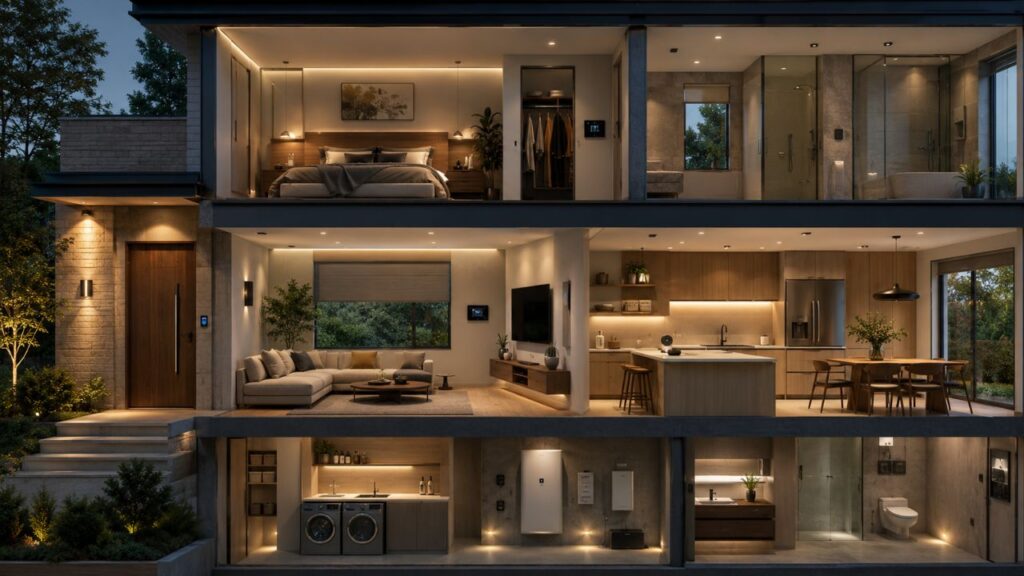
Entrance
The entrance should communicate safety and ease.
Use warm exterior lighting, a clearly visible door control and a discreet doorbell or camera. Hide the networking and power accessories, but keep them serviceable. A small table with concealed charging can give keys and phones a consistent home.
The best entry automation is usually subtle: lighting when needed, a useful lock status and fewer moments of uncertainty.
Living room
The living room benefits from scenes rather than many separate commands.
A “relax” scene could lower the blinds, warm the lamps and reduce media volume. A “guests” scene might restore brighter lighting and prevent automatic shutoff while people are sitting relatively still.
Avoid covering every wall with illuminated panels simply because they are available. One deliberate visual feature is more convincing than several competing effects.
Kitchen
Kitchen automation should support visibility, safety and routine.
Under-cabinet lighting can provide better task illumination than relying on a bright central fixture. Leak sensors may be placed near the sink, dishwasher and refrigerator connection. Voice control can be convenient when hands are occupied, but physical controls should remain available.
Be cautious when automating appliances that produce heat or require active supervision. Convenience should never bypass the appliance manufacturer’s operating instructions.
Bedroom
The bedroom needs less visible technology, not more.
A gradual morning-light routine can be useful, while blackout shades may support sleep and privacy. Keep bright indicator lights, unnecessary displays and audible notifications away from the bed.
Use a bedside physical control that can activate a simple nighttime scene. Reaching for a phone to turn off the room undermines the calm the system is supposed to create.
Bathroom and utility spaces
Bathrooms and utility rooms benefit from occupancy-aware lighting, ventilation and leak detection.
Sensors must be suitable for the environmental conditions where they are installed. Electrical work near water should be handled according to local code and by a qualified professional where required.
A nighttime bathroom routine should use low, warm light rather than full brightness. The objective is safe movement without making it difficult to return to sleep.
Outdoor areas
Outdoor technology must be weather-rated, securely installed and within reliable network range.
Useful applications include pathway lighting, gate status, irrigation control and soil-moisture monitoring. Matter 1.5 added standardized support for soil sensors that can participate in more coordinated watering systems.
Do not assume an indoor device is suitable outdoors simply because it fits inside a covered outlet.
Matter, Thread, Wi-Fi and Local Control
Smart-home terminology becomes confusing because these technologies perform different roles.
Wi-Fi connects many devices directly to the home network. It is widely available but may become crowded when a large number of devices depend on it.
Thread is a low-power mesh-network technology often used by sensors, locks and similar devices. A Thread border router connects that mesh to the wider home network.
Matter is an application-layer standard intended to improve interoperability across participating products and ecosystems. Google’s developer guidance describes Matter as an open smart-home standard that can provide a local control path with lower latency and greater reliability than a cloud-only connection. Matter does not currently cover every device type or every manufacturer-specific feature.
Zigbee and Z-Wave remain common in established smart-home systems and may still be the right choice when supported by a reliable hub and the required device range.
Do not choose a protocol as though selecting a sports team. Choose the combination that supports the devices, local behavior, coverage and maintenance model your home actually needs.
How to Make Smart Technology Visually Disappear
Technology integration can be handled at four visibility levels.
Display it
Use this for devices that are attractive enough to act as part of the décor: a well-designed lamp, art display or speaker.
Blend it
Match visible devices to nearby finishes. A white sensor on a white ceiling usually attracts less attention than a contrasting black unit. Repeat metal finishes intentionally rather than mixing chrome, brass and black without a plan.
Recess it
Use built-in niches, flush controls and planned cable routes when renovation permits. Recessed solutions should still allow ventilation, wireless communication and maintenance access.
Hide it
Routers, hubs, adapters and cable bundles may be concealed in furniture or a service area, provided the enclosure does not block signals or trap heat.
Never hide a microphone, camera or sensor in a way that misleads occupants or guests. Visual discretion should not become covert monitoring.
Privacy, Security and Household Control
Connected-home security is not an optional advanced topic. It is part of the design.
NIST has published a consumer IoT cybersecurity baseline and has supported cybersecurity-labeling work intended to help buyers evaluate connected products. Its guidance reflects the need to assess the security of the complete product, not only the visible device.
A practical household checklist includes:
- Use unique account passwords.
- Enable two-factor authentication where available.
- Install firmware and application updates.
- Remove accounts belonging to former residents or installers.
- Review microphone, camera and recording settings.
- Disable features that are not used.
- Choose vendors that state how long security updates will be provided.
- Keep an inventory of connected products.
- Consider separating IoT devices from computers containing sensitive information.
- Delete and reset devices properly before selling or discarding them.
Privacy also exists inside the household. Discuss camera locations, voice recordings, guest access and data sharing with the people who live in the home. A system can be secure from outsiders while still making occupants uncomfortable.
Three Sensible Budget Levels
Prices vary considerably by country, installation and device quality, so the most useful budget strategy is to prioritize outcomes rather than promise a fixed package price.
Starter level
Begin with one room or one recurring problem.
A starter setup might include a few lamps or switches, one motion sensor and a simple routine. Renters can focus on removable products and preserve the original switches and fixtures for move-out.
Coordinated level
Expand into climate, window treatments, entry security and environmental sensors after the first category has proved useful.
At this level, compatibility and network reliability become more important than purchasing the least expensive device in each category.
Integrated level
A professionally planned system may coordinate lighting circuits, whole-home shades, HVAC zones, security, audiovisual equipment and energy management.
Professional integration makes the most sense during construction or renovation, in large properties, or when reliability and centralized support are more important than DIY flexibility.
The expensive option is not automatically the better one. A modest system that everyone understands will outperform a complex installation that only the original installer can operate.
Common Smart Home DecoradTech Mistakes
Buying before choosing an ecosystem
This leads to duplicated hubs, incompatible features and too many applications.
Automating every possible action
Some actions are easier with a switch. Automation should remove friction, not demonstrate technical ability.
Removing physical controls
Essential lighting, access and climate functions need understandable manual operation.
Ignoring household members
A routine that repeatedly surprises or inconveniences people will be disabled.
Hiding devices without planning for heat and signal
A beautiful cabinet can become a poor home for a router.
Building overly complicated routines
The more conditions a routine depends on, the harder it is to diagnose. Begin with simple triggers and add complexity only when necessary.
Using poor names
“Lamp 7” and “Switch 12” become difficult to manage. Use room and function names such as “Kitchen Counter Lights” or “Upstairs Hall Night Light.”
Forgetting maintenance
Batteries, firmware, subscriptions and permissions need periodic attention. Document them.
Treating privacy as a settings task
Privacy decisions begin with product selection and placement, not after the cameras have already been installed.
Advanced Routines That Earn Their Place
An advanced automation should respond to context, not merely a clock.
Night safety
When movement is detected between midnight and dawn, selected pathway lights turn on at low brightness. They switch off after the area is clear.
Graceful departure
When the home becomes unoccupied, nonessential lights turn off, climate settings adjust moderately and the system checks selected doors. The user receives an alert only when something requires attention.
Leak response
A leak sensor triggers an immediate notification. In a compatible installation, the main water valve closes and selected household members receive clear instructions.
Glare control
Window shades respond to sunlight and room conditions rather than closing at the same time every day. Manual adjustments temporarily override the routine.
Guest mode
Guest mode disables intrusive presence-based routines, keeps essential controls available and limits access to private cameras or rooms.
Quiet recovery
When the internet returns after an outage, the system restores normal operation without turning on every light, playing announcements or sending dozens of low-value alerts.
These are useful because they respect the home’s context. They do not require occupants to perform for the technology.
A Practical Installation Checklist
Before purchasing:
- Identify the household problem.
- Decide what success will look like.
- Check wiring, power and network coverage.
- Choose the primary ecosystem.
- Confirm compatibility on the manufacturer’s current documentation.
- Review subscriptions and update policies.
- Decide how manual control will work.
- Consider privacy before selecting placement.
During installation:
- Add one category at a time.
- Test normal use, guest use and outage behavior.
- Use clear device names.
- Keep hubs and network equipment accessible.
- Label concealed cables.
- Document administrator accounts and recovery methods securely.
After installation:
- Ask every household member what feels easier or more annoying.
- Remove routines that generate unnecessary alerts.
- Review permissions and recordings.
- Check batteries and updates on a regular schedule.
- Reassess whether each connected device still earns its place.
A smart home is not finished when the devices connect. It is finished when the technology becomes quiet, predictable and useful enough that the household stops thinking about it.
Frequently Asked Questions Asmart home decoradtechbout
What is smart home DecoradTech?
Smart home DecoradTech is a design-first approach that combines home automation with interior design. The aim is to improve comfort, safety and convenience while keeping devices, controls and cables visually coherent with the home.
Is DecoradTech an official smart-home standard?
No widely recognized technical standard is formally called DecoradTech. The term is used inconsistently online. Matter, by contrast, is an established smart-home interoperability standard developed through the Connectivity Standards Alliance.
What should I automate first?
Begin with a recurring frustration. For many homes, lighting is the easiest starting point because it affects atmosphere, safety and daily convenience without requiring a whole-home installation.
Can smart-home devices work without the internet?
Some can operate locally, while others depend heavily on cloud services. Offline behavior varies by device, platform and feature. Confirm local control and manual backup before purchasing.
Is Matter the same as Thread?
No. Matter is a smart-home interoperability standard. Thread is a low-power mesh-network technology that some Matter devices use to communicate.
Can renters use smart home DecoradTech?
Yes. Smart bulbs, plug-in lamps, removable sensors, freestanding air-quality monitors and nonpermanent shades can provide useful automation without altering wiring. Keep original hardware and check the lease before making changes.
How do I prevent smart devices from ruining my décor?
Plan placement before purchase, match visible finishes, conceal cables safely, use one intentional technology feature per area and keep routers, hubs and adapters accessible but visually quiet.
Are smart homes secure?
They can be managed more securely, but no connected system is risk-free. Product support, account protection, software updates, camera placement, network design and household privacy practices all matter.
Do smart-home upgrades increase property value?
Some buyers value reliable lighting, climate, security and network infrastructure. However, highly personalized or unsupported systems can become a liability. Favor transferable controls, clear documentation and products with continued manufacturer support.
Is professional installation necessary?
Plug-in devices and many sensors are suitable for careful DIY installation. Electrical wiring, complex HVAC controls, built-in shades, whole-home audiovisual systems and work in wet areas may require qualified professionals and compliance with local codes.