

A home does not become intelligent simply because several objects connect to Wi-Fi.
The real test is more practical. Do the lights respond when your hands are full? Does the heating reduce itself when nobody is home? Can a family member unlock the door without searching for an app? Will the system still work if the internet goes down?
That is the useful idea behind home device DecoradTech: choosing and integrating home technology so that it reduces everyday friction while remaining visually quiet.
DecoradTech is not an official smart-home standard or certification. The term is used loosely online, often to describe the meeting point between décor and technology. A sensible working definition is therefore:
Home device DecoradTech is the selection, placement and automation of connected home devices in a way that improves comfort, safety or efficiency without making the home feel cluttered, complicated or dominated by gadgets.
The emphasis matters. A device should not earn a place in your home merely because it is new or controllable by phone. It should solve a recurring problem, work reliably and fit the people and room around it.
What separates a useful home device from another gadget?
Many disappointing smart-home purchases begin with the product rather than the problem.
A person sees a connected coffee maker, color-changing lamp or app-controlled diffuser and imagines a more convenient home. After a few weeks, the app is rarely opened. Notifications are disabled. The device becomes an ordinary appliance with a higher price and another password.
A useful DecoradTech device usually has three qualities.
First, it addresses a task that happens frequently. Lighting used every evening, temperature adjusted every day and a door checked several times a week are better automation candidates than a novelty used once a month.
Second, its smart features remove steps. A motion sensor that turns on a hallway light removes effort. A bulb that requires unlocking a phone, opening an app and selecting a room may add effort compared with pressing a switch.
Third, the device remains understandable to everyone who lives in the home. Apps and voice commands can be useful, but physical controls and manual overrides are still essential. Guests, children, older relatives and housemates should not need an account simply to turn on a lamp.
Ask these seven questions before buying
A disciplined buying process prevents most smart-home frustration.
What recurring problem will this solve?
Name the exact situation.
“Make the house smarter” is too vague. “Turn off the downstairs lights after everyone goes to bed” is specific. So is “alert me before a small water leak damages the kitchen cabinet.”
When the problem is clear, it becomes easier to judge whether the device is worth its price.
How often will the benefit occur?
Daily improvements deserve more investment than occasional conveniences. Lighting, climate control, leak detection, door access and cleaning usually have a stronger practical case because they affect frequent routines.
Does it work with the system I already use?
Check the product’s compatibility before paying. “Works with Alexa,” “Works with Apple Home,” “Works with Google Home” and “Matter certified” are not interchangeable statements.
Some products expose only basic controls to another platform. A light may switch on and dim correctly while advanced scenes, energy data or adaptive effects remain available only in the manufacturer’s app.
What still works without the internet?
A strong device has graceful failure.
A smart switch should still behave like a switch. A thermostat should continue controlling the heating system. A lock should provide a physical, keypad or other dependable entry method. A cloud-dependent routine that stops completely during an outage may be convenient, but it is not resilient.
Discover SpiritusWellness.net for practical wellness insights, healthy living tips, mindfulness, self-care, nutrition, fitness, and holistic well-being guidance for a healthier, balanced life.
5. How long will the manufacturer support it?
Smart devices depend on software. Security problems are corrected through firmware and app updates, but support does not continue forever.
The U.S. Federal Trade Commission advises buyers to look for information about how long a manufacturer will provide software updates and to consider what the product will do when those updates end.
A cheap device with no published support period may be more expensive in the long run than a better-supported alternative.
Are recurring fees required?
Cameras, doorbells and security systems may reserve useful features for paid plans. Before buying, check:
- Whether recorded video requires a subscription
- How much local storage is available
- Whether alerts work without payment
- Whether multiple users cost extra
- Whether advanced automations require a premium service
The purchase price is only the entry cost.
Will it physically fit the home?
Compatibility is not only digital.
A smart thermostat may require specific HVAC wiring. A smart wall switch may need a neutral wire. A camera needs the correct field of view, power source and network signal. A blind motor must be able to move the chosen fabric and fit the window hardware.
Measurements and wiring checks are less exciting than product comparisons, but they prevent expensive returns.
Choose an ecosystem before filling the house with devices
An ecosystem is the main platform through which household members control devices and create automations. Amazon Alexa, Apple Home and Google Home are common consumer options. More advanced users may prefer a locally managed automation platform.
There is no universally best ecosystem. The right choice depends on the phones, speakers, services and privacy expectations already present in the household.
The practical objective is consistency. A home with ten devices should not require ten unrelated apps for daily operation.
Manufacturer apps may still be needed for setup, firmware or specialized features, but ordinary controls should be consolidated wherever possible.
Matter, Thread, Wi-Fi and hubs in plain English
Smart-home terminology becomes confusing because these names describe different layers of the system.
Matter
Matter is an interoperability standard developed through the Connectivity Standards Alliance. It is intended to help compatible products work across multiple smart-home ecosystems. Matter uses internet-protocol networking and can operate over Wi-Fi or Thread; Bluetooth Low Energy is used during initial setup.
The current Matter 1.6 release focuses on easier setup, improved multi-ecosystem management and more context-aware control. That progress is valuable, but a Matter logo should not be interpreted as a promise that every feature will appear identically in every app. Platform support and device implementation still matter.
Thread
Thread is a low-power mesh network designed for connected devices such as sensors, locks and lights.
Battery-powered devices conserve energy, while powered Thread devices can extend the mesh. A Thread border router connects that mesh to the home’s wider IP network. Border-router functionality may already be built into a compatible speaker, display, router or other powered device.
Wi-Fi
Wi-Fi devices connect directly to the home network. They are simple to understand and work well for products that need more bandwidth, including some cameras and displays.
The trade-off is that dozens of inexpensive Wi-Fi devices can create management, coverage and security challenges. Buyers should check frequency requirements because many consumer devices still depend on a 2.4 GHz network during setup.
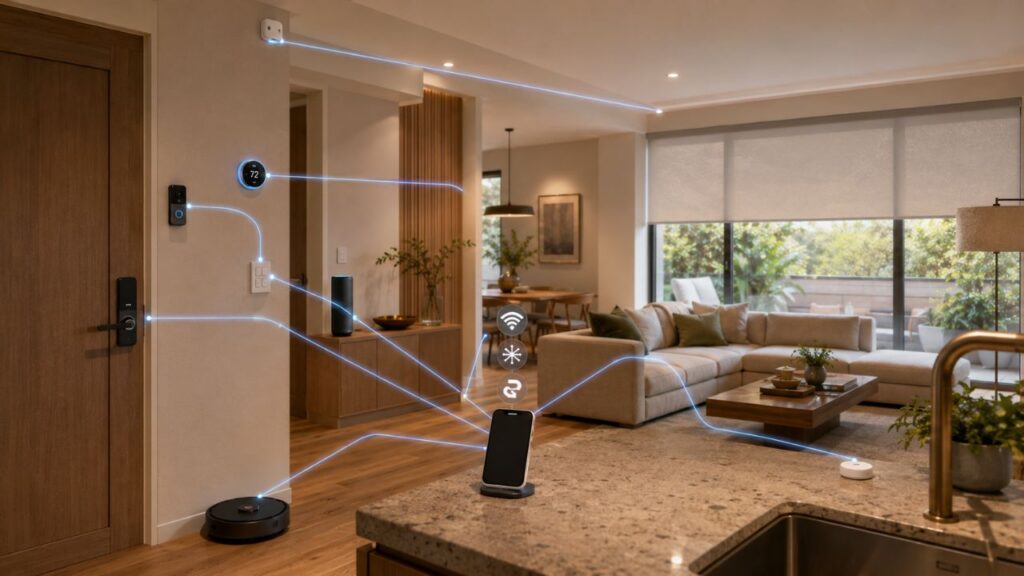
Hubs and bridges
A hub or bridge connects devices that use a particular protocol or manufacturer system to the wider smart home.
A dedicated bridge is not automatically a disadvantage. A well-designed bridge can improve responsiveness, reduce Wi-Fi congestion and allow reliable local control. The real question is whether the extra hardware creates durable value or merely locks the buyer into a closed system.
Which home devices deliver the most practical value?
The best category depends on the problem being solved, but some devices consistently provide more useful outcomes than novelty appliances.
| Device category | Strong use case | Check before buying |
|---|---|---|
| Smart lighting and switches | Scheduling, dimming, presence-based lighting and safer nighttime movement | Bulb versus switch strategy, physical controls, neutral wire, color quality |
| Thermostats and climate controls | Reducing unnecessary heating or cooling and improving comfort | HVAC compatibility, required wiring, zoning and professional installation |
| Leak and safety sensors | Early alerts near sinks, heaters, washing machines and pipes | Alarm volume, battery reporting, local alarm, alert delivery |
| Locks and entry devices | Keyless access, temporary codes and entry records | Manual backup, battery behavior, door alignment and access sharing |
| Cameras and doorbells | Monitoring entrances and receiving visitor alerts | Storage fees, privacy zones, field of view, power and data retention |
| Smart plugs | Scheduling suitable lamps and low-risk appliances | Electrical rating, appliance behavior after power restoration and physical size |
| Robot cleaners | Repeated floor cleaning in busy or pet-owning homes | Floor plan, thresholds, cords, maintenance and replacement parts |
| Motorized blinds | Light control, privacy and hard-to-reach windows | Fabric weight, power source, window measurements and manual operation |
| Energy monitors | Identifying consumption patterns and automating plug loads | Measurement accuracy, installation and actionable reporting |
Smart thermostats have one of the clearest evidence-based energy cases. ENERGY STAR reports average savings of approximately 8% of heating and cooling bills, although actual results depend on climate, occupancy, equipment and previous behavior.
That does not mean every thermostat will pay for itself in every home. A household that already maintains efficient schedules may see less benefit than one that regularly heats or cools an empty property.
Make the technology visually quiet
DecoradTech differs from an ordinary gadget list because placement and appearance are part of the decision.
Control visual weight
A device attracts attention through contrast, protrusion, cables, indicator lights and awkward placement. Matching its finish to the surrounding surface can reduce that visual weight.
A white thermostat may disappear on a white wall but look accidental on timber paneling. A black camera may suit a dark exterior soffit but dominate a pale living-room corner.
Hide cables without hiding necessary airflow
Cable raceways, furniture channels, recessed outlets and planned power locations can make a large difference.
However, concealment should never interfere with ventilation, microphones, wireless performance, maintenance access or safety. Placing an active speaker or network device inside a decorative container may affect sound, heat and signal quality. The better approach is to select an appropriate mounting position or a device designed to be integrated.
Respect sensor requirements
A motion sensor needs a useful detection angle. A camera needs an unobstructed view. A temperature sensor should not sit in direct sunlight or beside a heating vent.
A visually perfect position that produces unreliable readings is not good design. Function comes first for safety and sensing devices; the aesthetic work happens within those limits.
Use fewer, better-placed devices
Technology disappears most successfully when there is less of it.
One well-positioned occupancy sensor can be better than several decorative smart bulbs controlled separately. A wall switch that controls an entire lighting scene can be calmer than a collection of lamps requiring individual voice commands.
A room-by-room starting plan
Entrance
Prioritize access and safety:
- A dependable smart lock or video doorbell
- Exterior lighting triggered by time or motion
- Door sensors where alerts provide real value
- A physical or keypad method of entry
Avoid sending a notification for every ordinary movement. Alerts should be reserved for events that deserve attention.
Living room
Start with lighting and control:
- Dimmable or tunable lighting
- One accessible physical scene control
- Thoughtful cable management
- Audio positioned for sound quality rather than visibility alone
Automations might adjust lighting for reading, television viewing and late-evening use without requiring several spoken commands.
Kitchen and utility areas
Focus on prevention and hands-full convenience:
- Water-leak sensors near likely failure points
- Under-cabinet task lighting
- Timers and voice reminders
- Energy monitoring for suitable loads
- Smoke and carbon-monoxide protection appropriate to local requirements
Do not assume every appliance is suitable for remote power control. Heating and high-load equipment should only be automated in ways permitted by its manufacturer and electrical rating.
Bedroom
The most useful upgrades are usually quiet:
- A bedside physical lighting control
- Gradual morning lighting
- Automated blinds where appropriate
- Temperature scheduling
- Low-level nighttime pathway lighting
The goal is fewer interactions, not another glowing screen beside the bed.
Bathroom
Humidity, water and electrical safety narrow the available options. Use products designed and rated for the location, and involve a qualified professional where fixed electrical work is required.
A leak sensor or properly installed ventilation control may offer more value than an elaborate smart mirror.

Privacy and security belong in the buying decision
Smart-home security is not solved by choosing one brand or ecosystem. It depends on device design, manufacturer support, account protection and the home network.
Before installation:
- Change default credentials.
- Enable multi-factor authentication where available.
- Turn on automatic updates.
- Review microphone, camera and data-sharing settings.
- Remove access for former residents or unused accounts.
- Check which household members can view recordings or unlock doors.
- Consider a separate network for connected devices.
NIST recommends considering network segmentation so that an easily compromised home device is not placed on the same network as computers containing sensitive information. The FTC also recommends current firmware, updated apps and the device’s available security features.
Support life matters as much as the initial password. NIST research notes that unsupported smart devices can remain connected despite no longer receiving security fixes, creating safety and security concerns.
Build automations that reduce decisions
A useful automation contains three parts:
- Trigger: What starts it?
- Condition: When should it be allowed to run?
- Action: What should happen?
For example:
- Trigger: Motion is detected in the hallway.
- Condition: The time is after sunset.
- Action: Turn on the hallway light at a low brightness for three minutes.
Conditions prevent bad automations. Without the sunset condition, the light may switch on unnecessarily throughout the day.
More advanced routines can consider occupancy, door state, temperature or whether the home is in sleep, away or guest mode. The aim is not to automate every possible action. It is to remove repeated decisions whose correct outcome is predictable.
Common mistakes that make a smart home worse
Buying before choosing a platform
This creates app clutter, fragmented routines and incompatible features.
Replacing dependable controls with phone-only controls
A home should remain usable when a phone is charging, lost or held by someone else.
Automating rare tasks
The setup and maintenance burden may exceed the time saved.
Ignoring subscriptions
A camera that looks inexpensive may become costly after several years of storage fees.
Choosing cloud-only devices for essential functions
Remote access may be useful, but locks, lights and climate equipment need dependable local or manual behavior.
Hiding devices in ways that reduce performance
Cameras, sensors, speakers and network equipment have physical requirements. Concealment should not block lenses, microphones, airflow or wireless signals.
Creating too many alerts
When every movement, open door and minor temperature change creates a notification, genuinely important warnings are easier to miss.
Assuming “Matter” means identical functionality everywhere
Matter improves interoperability. It does not remove the need to check platform support, device features and installation requirements.
A realistic way to begin
Do not begin with an entire house.
Choose one recurring frustration in one room. A dark hallway, forgotten downstairs lights, inconsistent temperature or concern about a leaking washing machine are all sensible starting points.
Install one solution and use it for several weeks. Observe whether it saves time, whether the household understands it and whether it remains reliable. Only then add the next device.
A successful DecoradTech home is not the one with the largest number of connected objects. It is the one that quietly removes small problems without constantly asking for attention.
Frequently Asked Questions For Home Device Decoradtech
What is home device DecoradTech?
Home device DecoradTech is an informal term for integrating connected home devices with interior-design thinking. The objective is to improve comfort, safety or efficiency while keeping controls simple and technology visually appropriate.
Is DecoradTech an official smart-home standard?
No recognized technical standard or certification called DecoradTech was identified. Matter, Thread, Wi-Fi, Zigbee and Z-Wave are examples of actual smart-home technologies or standards. DecoradTech is better treated as an editorial description of design-conscious smart-home integration.
Which device should a beginner buy first?
Start with the device that solves the most frequent problem. For many households, that is smart lighting, a smart switch, a leak sensor or a thermostat. The best first purchase is not automatically a smart speaker.
Do Matter devices work with Alexa, Apple Home and Google Home?
Matter is designed to support interoperability across major ecosystems, but buyers should still check whether the specific device type and desired features are supported by their chosen platform. Advanced functions may remain in the manufacturer’s app.
What is the difference between Matter and Thread?
Matter defines how compatible smart-home devices communicate at the application level. Thread is a low-power mesh-networking technology over which Matter can operate. A Thread device normally needs access to a Thread border router.
Can a smart home work without the internet?
Some devices and automations can continue working locally, while cloud-dependent features may stop. Check whether the product offers local operation, physical controls and manual fallback before buying.
Are smart-home devices secure?
No connected device is risk-free. Security improves when buyers choose supported products, use unique passwords, enable multi-factor authentication, apply updates, review permissions and separate less trusted devices from sensitive computers.
Can renters use DecoradTech ideas?
Yes. Smart bulbs, plug-in sensors, removable controls, freestanding lamps, robot cleaners and some retrofit blind motors require little or no permanent modification. Renters should obtain permission before replacing locks, switches or fixed wiring.
How much does a DecoradTech setup cost?
There is no fixed amount. A focused starter setup may contain one or two devices, while whole-home lighting, climate, security and window automation can require substantial investment. Include hubs, installation, batteries, replacement parts and subscriptions when calculating cost.
How do I prevent smart-home app clutter?
Choose a primary ecosystem, favor products that integrate with it, and use manufacturer apps mainly for setup and maintenance. Before buying, confirm that the daily controls you need are available in the primary app.